

Key takeaways
- Five learning toy laptops for kids compared by age band, activity count, screen style and batteries, from baby laptops to a bilingual school-age pick.
Choosing a toy laptop is really choosing how long it stays interesting. A nine-month-old needs chunky buttons that answer back instantly, a three-year-old mostly wants to imitate your workday, and a six-year-old is ready for spelling games and simple sums. Buy too young and the toy gets mashed and abandoned; buy too old and a baby cannot trigger anything on purpose. The age band printed on the box is therefore the first real decision, ahead of color, characters or activity counts.
This roundup serves four kinds of buyers: parents replacing their own keyboard as a baby’s favorite chew toy, families shopping for a preschooler’s first pretend computer, gift buyers who need an age they can trust, and bilingual households. The five picks below were chosen from the names and specifications on their Amazon pages, comparing stated age ranges, activity counts, screen types and battery requirements rather than marketing claims.
Quick Picks
As an Amazon Associate we earn from qualifying purchases.
| Product | Best for | Key spec from title |
|---|---|---|
| LeapFrog 2-in-1 LeapTop Touch, Pink | Preschoolers who switch between typing and tapping | Screen flips to convert from keyboard to tablet mode |
| VTech Brilliant Baby Laptop | Babies exploring cause and effect on a lap | Nine brightly colored shape buttons with a movable mouse |
| VTech Toddler Tech Laptop | Toddlers who copy your video calls and selfies | Mirror screen that lights up with emojis |
| VTech Tote and Go Laptop, Orange | Kids learning words, spelling and mouse control | 20 interactive activities teaching 60+ words |
| Lexibook Educational and Bilingual Laptop, JC598i2 | Early elementary practice in two languages | 124 activities in English and Spanish |
How to Choose
Match the stated age band to your child, not the birthday you wish for
Manufacturers print a minimum and maximum age on every listing, and in this category those numbers track the content closely. Baby laptops rated from six months rely on lights, sounds and one-press responses, while models rated three to six years assume a child can follow spoken prompts and pick answers from a menu. A laptop bought a full band too early usually becomes a noise maker the child bangs rather than plays, so check the stated range against your child’s current stage before anything else.
Decide what the screen actually needs to do
Toy laptop screens fall into three camps. The simplest are light-up panels or mirrors that react to button presses, which is plenty for babies. Preschool models add a small display with animations tied to letters and numbers. School-age models use a plain LCD that shows words, equations and a clock face as text. None of these is a video screen, and none connects to the internet. Decide whether your child needs pictures that move, or is ready to read prompts, because that single choice narrows the field faster than brand loyalty does.
Count activities, then check how they are organized
Headline activity counts range from a handful of app buttons to more than a hundred games, but the organization matters more than the total. Look for activities grouped into named categories, such as letters, numbers, animals and music, and for difficulty that progresses instead of repeating. Personalization is a genuine plus at the preschool stage: models that let a child enter their name, age or avatar turn spelling practice into something personal. A smaller count with clear levels usually outlasts a huge count of near-identical mini games.
Plan for batteries, volume and travel from day one
Every laptop here runs on AA batteries, and most ship with demo cells that fade quickly, so budget for a fresh set at unboxing. Check whether the listing mentions volume control or an automatic shut-off, because a toy that plays melodies at full blast in a car seat wears out its welcome fast. For travel, weight and a carrying handle matter: the baby models below weigh about a pound and a half or less, while school-age models trade some portability for a bigger keyboard and a mouse.
The 5 Best Options
LeapFrog 2-in-1 LeapTop Touch, Pink
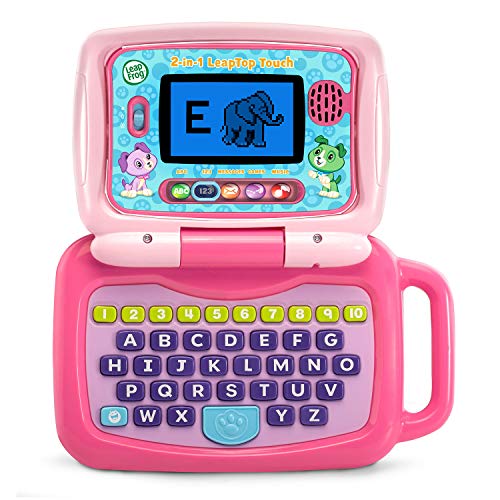
This is the pick for the preschooler who cannot decide whether they want your laptop or your tablet, because the screen flips around to serve as both. Open it for a full A-to-Z keyboard with number keys, close it and the display swivels into a touch tablet. Five learning modes cover ABCs, numbers, games, music and pretend messages, and parents can customize the toy so it helps a child spell their own name, which gives the messages mode a personal hook most rivals lack.
Specs
- Model: 80-600950
- Age range: 2 to 5 years
- Screen: flips from keyboard mode to touch tablet mode
- Keyboard: letters A-Z and numbers 1-10
- Learning modes: ABCs, Numbers, Games, Music and Messages
- Batteries: 3 AA required (included for demo purposes)
- Dimensions: 2.05 x 10.08 x 6 inches
- Item weight: 1.3 pounds
- Material: plastic
Best for: children ages two to five who want one toy that works as both a laptop and a tablet.
Watch out for: the included batteries are demo cells, so swap in fresh AAs early; the screen shows animations, not video, so set expectations if your child knows real tablets.
VTech Brilliant Baby Laptop

For the youngest buyers in this roundup, this travel-ready laptop keeps everything at the one-press level: nine brightly colored shape buttons and a movable mouse that interact with a light-up screen. Three modes introduce animals and their sounds, shapes and colors, or songs and melodies, and the toy plays more than 115 songs, melodies, sounds and phrases in total. Opening and closing the lid teaches opposites, a spinning roller builds motor skills, and the chunky carrying handle means the laptop can commute between rooms, strollers and car seats without being dragged by its screen.
Specs
- Model: 80-191200
- Age range: 6 to 36 months
- Buttons: nine brightly colored shape buttons
- Mouse: movable mouse included
- Play modes: animal, shape and music
- Content: 115+ songs, melodies, sounds and phrases
- Batteries: 2 AA required (included for demo purposes)
- Dimensions: 2.2 x 11.1 x 12.48 inches
- Item weight: 1.5 pounds
- Material: plastic
Best for: babies from six months who are ready for a first cause-and-effect laptop of their own.
Watch out for: the ceiling is three years, so a child already past two will outgrow the content quickly; new batteries are recommended because the included set is for demonstration.
VTech Toddler Tech Laptop
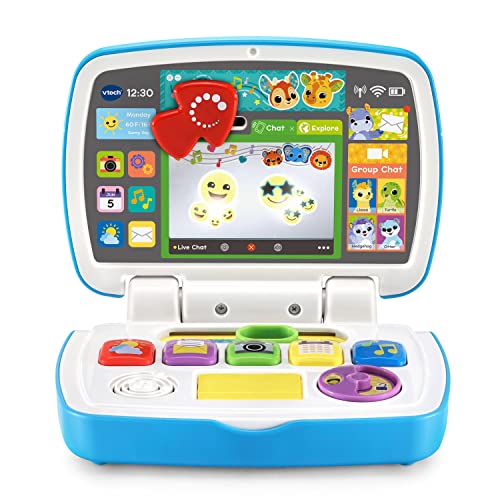
Instead of a picture screen, this tot-sized laptop puts a mirror where the display would be, and toddlers who love seeing their own face will get the joke immediately. Five colorful app buttons cover the weather, email, camera, calendar and music, a home button adds light-up emojis over the child’s reflection, and a sliding arrow cursor lets them choose an animal friend to chat with. A spinning disc, slider and arrow keep little fingers busy between the sound effects, which suits the one-to-three age band far better than a keyboard they cannot yet use.
Specs
- Model: 80-524700
- Age range: 12 to 36 months
- Screen: reflective mirror screen with light-up emojis
- Buttons: five app buttons (weather, email, camera, calendar, music)
- Educational objectives listed: cause and effect, counting, fine motor skill
- Batteries: 3 AA required (included for demo purposes)
- Dimensions: 1.8 x 7 x 10 inches
- Item weight: 0.99 pounds
- Material: plastic
- Included components: Toddler Tech Laptop, Quick Start Guide
Best for: one- to three-year-olds who imitate phone calls, video chats and picture taking.
Watch out for: this is pretend play rather than a curriculum, so do not expect alphabet or phonics teaching; it is also the smallest laptop here, which bigger three-year-olds may find babyish.
VTech Tote and Go Laptop, Orange

The Tote and Go is the step up for children who have outgrown button mashing and want a machine that asks them questions back. Its 20 interactive activities teach more than 60 words alongside spelling, shapes, logic and animal recognition, organized under category buttons for letters and words, numbers and shapes, animals and food, logic and games, and music. An attached mouse introduces real cursor control, 30 melodies fill the music mode, and the laptop can be personalized with the child’s name, age and avatar, so the penguin guide greets them personally at start-up.
Specs
- Model: 80-155400
- Age range: 36 months to 6 years
- Activities: 20 interactive activities with progressive levels
- Content: 60+ words and 30 popular melodies
- Mouse: attached mouse for basic mouse skills
- Personalization: name, age and avatar
- Batteries: 2 AA required (included for demo purposes)
- Dimensions: 2.68 x 10.67 x 8.23 inches
- Item weight: 1.8 pounds
- Material: plastic
Best for: three- to six-year-olds ready for spelling, vocabulary and their first mouse practice.
Watch out for: this long-running model comes in several colors with different listings, so confirm you are ordering the Orange version; screen contrast is adjustable in settings, which younger children may need an adult to set.
Lexibook Educational and Bilingual Laptop, JC598i2
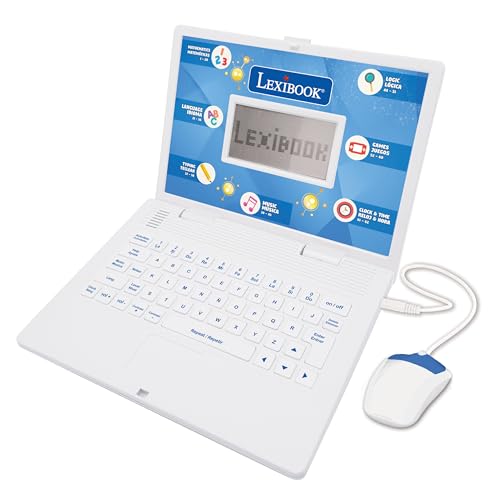
The Lexibook is the school-skills outlier in this group: 124 activities split evenly between English and Spanish, covering word learning, mathematics, typing, general knowledge, logic, music and clock reading, each subject offered at different difficulty levels. A real mouse is provided for browsing the menus, and the realistic laptop shape and sounds make it feel like a grown-up computer rather than a baby toy. Because the content is text- and prompt-driven, it suits children who can already follow instructions, and it gives bilingual families structured practice instead of just translated labels.
Specs
- Model: JC598i2
- Manufacturer recommended age: 3 years and up
- Activities: 124 total (62 in each language)
- Languages: English and Spanish
- Subjects: mathematics, typing, logic, clock reading, music and games
- Mouse: included
- Batteries: 2 AA required
- Dimensions: 9.4 x 7.1 x 0.1 inches
- Item weight: 1.14 pounds
- Release date: September 1, 2021
Best for: early elementary children, especially in bilingual households, who need typing, math and clock practice.
Watch out for: the listing states 2 AA batteries are required without confirming a set in the box, so have spares ready; the 124 headline count is 62 activities per language, not 124 in English alone.
Which One Fits Your Situation
Your baby keeps grabbing your real laptop
Choose between the two baby models by what fascinates your child. The Brilliant Baby Laptop answers with lights, animal sounds and shape buttons, which suits babies who poke and watch. The Toddler Tech Laptop answers with a mirror and pretend apps, which suits babies who study faces and copy phone behavior. Both are rated from the first year of life, both run on AA batteries, and either gives small hands a keyboard of their own to claim.
A preschooler wants to work alongside you
The LeapTop Touch is built for the child who sits next to your desk and demands a computer of their own. Its full letter keyboard, pretend email mode and name-spelling customization make the imitation feel official, and flipping it into tablet mode refreshes the same toy when the laptop pose gets old. It is the only pick here rated squarely for the two-to-five band, so it also has the longest useful life for a three-year-old.
Long drives, waiting rooms and flights
Portability splits the lineup cleanly. The Toddler Tech Laptop is the lightest at just under a pound and has no loose parts, while the Brilliant Baby Laptop adds a chunky handle sized for small hands to carry themselves. The Tote and Go is the heaviest here but still under two pounds, and its question-and-answer activities hold an older child’s attention longer per battery set. Whichever you pack, install fresh batteries before the trip rather than trusting the demo set.
Bilingual practice or kindergarten readiness
The Lexibook stands alone for structured school skills: typing, mathematics, clock reading and logic in both English and Spanish, with difficulty levels that let a child keep using it as skills grow. For an English-only household focused on letters and vocabulary instead, the Tote and Go’s 60-plus words and spelling personalization cover similar ground in a friendlier format for younger children.
Common Mistakes
- Buying by character or color first and checking the age band later, which is how a six-year-old ends up with a baby laptop that only plays songs.
- Assuming a toy laptop works like a real tablet, then being disappointed that there is no video, no touchscreen apps and no internet connection.
- Leaving the included demo batteries in place and concluding the toy is faulty when the sounds weaken or the screen dims after a few days.
- Counting total activities without noticing they are split across languages or repeated across difficulty levels, which inflates what a child actually gets.
- Handing a school-age model with small text prompts to a pre-reader, who then treats a learning tool as a random button box.
Frequently Asked Questions
Do any of these toy laptops connect to the internet?
No. All five are self-contained electronic toys powered by AA batteries, with their activities stored on the device itself. There are no accounts, downloads, cameras that upload, or chat functions with strangers. The pretend email and messaging modes are scripted play with built-in characters, so a child can imitate your work habits without any connection leaving the toy.
Which toy laptop is best for a one-year-old?
The Toddler Tech Laptop is rated from 12 months and leans on a mirror, chunky app buttons and sliders rather than letters, which matches a one-year-old’s skills. The Brilliant Baby Laptop starts even earlier at six months and adds more songs and shape buttons. Either works at one year; pick the mirror model for face-obsessed babies and the shape-button model for babies who love music.
How long do the batteries last, and are they included?
Listings for the LeapFrog and VTech models state that AA batteries are included for demo purposes only, and manufacturers recommend fresh cells for regular use, so expect the packed-in set to fade quickly. The Lexibook listing requires 2 AA batteries without confirming a set in the box. Runtime depends on volume and play patterns, and automatic shut-off features, where fitted, stretch a set considerably.
Can a toy laptop actually help with school readiness?
It can support the edges of readiness: letter recognition, counting, vocabulary, listening to prompts and early mouse control are all practiced by the preschool and school-age picks here. What a toy laptop cannot do is teach reading by itself or replace shared book time. Treat it as structured practice and pretend play that builds familiarity with keyboards and questions, not as a curriculum in a clamshell.
More from Amazon
Programs that pair well with the guide above. Offers and eligibility are set by Amazon and may change.
Collect the home and kitchen items you want in one registry that guests can shop from.
Create a wedding registrySet up recurring deliveries of everyday items on eligible products. Terms and savings are set by Amazon.
Explore Subscribe & SaveFree shipping on eligible items, Prime Video and more. Eligible new members can start with a free trial.
Start a Prime free trialAudiobooks and podcasts to listen to on the go. Eligible new members can start with a free trial.
Try Audible freeAs an Amazon Associate we earn from qualifying purchases.




Write Your Review
No reviews yet. Be the first to share your experience!