

Key takeaways
- Compare the best LCD writing tablets for kids: screen sizes, erase locks, screw-secured battery doors and stylus tethers, checked from each Amazon page.
The real decision is not whether a doodle board keeps a child busy for one car ride. It is whether the board still works, still has its stylus, and still erases cleanly after months of being dropped, sat on and stuffed into a backpack, and whether its tiny battery sits behind a door a toddler cannot open. Screen size, the erase lock and the battery cover separate the boards that last from the ones that get binned by the next holiday.
This guide serves parents of toddlers starting first scribbles, families equipping grade-schoolers for spelling and math practice, and gift buyers who want a quiet travel toy. Every product below was picked from the names, model numbers and specification fields published on its own Amazon page, so the sizes, batteries and locks compared here are the ones the makers themselves list.
Quick Picks
As an Amazon Associate we earn from qualifying purchases.
| Product | Best for | Key spec from title |
|---|---|---|
| KOKODI LCD Writing Tablet, 10 Inch Colorful | Toddlers whose battery door must stay shut | 10 Inch Colorful Doodle Board |
| TEKFUN LCD Writing Tablet for Kids, 10 Inch | Long car rides and flights | 10-inch Coloring Drawing Pad |
| Bravokids 10 Inch LCD Writing Tablet | Daily letter and math practice at home | 10 Inch LCD Writing Tablet |
| FLUESTON LCD Writing Tablet, 10 Inch | A slim board that lives in a school bag | 10 Inch Colorful Electronic Board |
| ORSEN 8.5 Inch LCD Doodle Board, Dinosaur | Two-to-six-year-olds who want a character board | 8.5 Inch LCD Doodle Board |
How to Choose
Screen Size Against the Child’s Age
An 8.5-inch board suits small hands and short attention spans: there is room for big letters, simple shapes and tic-tac-toe, and the board itself stays light enough for a two-year-old to carry. A 10-inch screen gives a five-to-eight-year-old space to write full words, line up math problems and draw scenes with more than one character. Bigger boards exist, but past 10 inches the board stops fitting a car-seat lap or a child’s backpack, which is where these tablets earn their keep. Match the screen to the smallest bag it must travel in.
Battery Door Safety and Battery Type
Every board in this guide runs on a small button or coin cell, and those cells are a genuine swallowing hazard for under-threes. The safer designs fix the battery cover with a screw, so opening it needs a tool an adult controls. Check the listing for that detail before anything else if the board is for a toddler. Also note the cell model the listing names, because replacements are cheap only when you know which coin cell to buy. Boards that hide the battery type force a mid-life guessing game when the erase button starts failing.
Erase Lock and One-Button Clearing
All LCD boards erase the whole screen at once; none of them can delete a single stroke. A lock switch freezes the screen so a finished drawing survives the ride home instead of vanishing when a small hand bumps the erase button. For spelling lists and math drills the lock matters less, because clearing fast is the point. Decide which frustration your child handles worse: losing a picture they loved, or waiting while you unlock the board before they can start again. Most boards put the lock on the back edge, out of the way but easy for an adult thumb.
Stylus Storage and Tethers
The stylus is the first part to disappear. Better boards answer that three ways: a holder clipped to the frame, a string or elastic tether tying pen to board, or a slot the pen clicks into. A loose pen in a car footwell is gone for the trip. If the listing shows only a bare stylus with no storage, budget for a spare pen or accept crayons on paper as the backup. Left-handed children also benefit from a movable holder or a tether long enough to reach across the screen from either side.
The 5 Best Options
KOKODI LCD Writing Tablet, 10 Inch Colorful
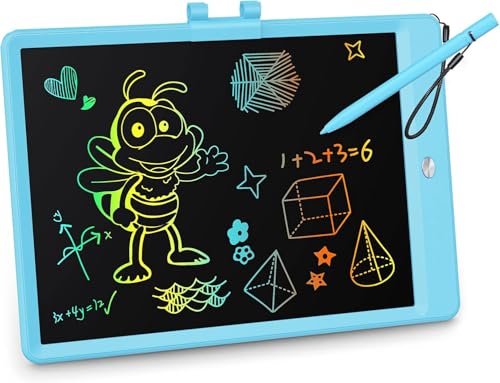
KOKODI builds this board around the two things parents of toddlers ask about first: a battery compartment secured with a screw, and a stylus that stays attached. The 10-inch colorful screen uses pressure-sensitive lines, so marks thicken when a child presses harder, and the listing claims roughly 100,000 writings from a battery that lasts three to six months. Rounded corners and a plastic case are meant for drops. It suits ages three to six best, where the board doubles as a first writing surface and a mess-free coloring substitute at restaurants.
Specs
- Screen: 10-inch colorful LCD, pressure-sensitive
- Dimensions: 9.8 x 6.9 x 0.24 inches
- Weight: 150 g per the listing text
- Battery: replaceable, about 3 to 6 months of use, compartment secured with a screw
- Erase: one-button clear with a lock key to hold content
- Included: tablet, drawing pen, pen string, pen holder
- Recommended age: 3 years and up
Best for: toddlers and preschoolers whose parents want the battery door screwed shut.
Watch out for: the listing notes fine scratches can appear on the screen in transit; one press of the erase button clears them.
ASIN: B082KFTF41
TEKFUN LCD Writing Tablet for Kids, 10 Inch

TEKFUN pitches its 10-inch board squarely at travel, and the listing backs that up with claims of a waterproof, drop-resistant body and a weight of only 150 grams. The colorful screen takes lines from the stylus or any hard edge, a lock key keeps a drawing from being wiped mid-flight, and the battery is rated by the listing at about six months and 100,000 writings before replacement. It fits children from three years old, and the slim frame slides into a seat-back pocket. Families who fly or drive long distances will get the most from this one.
Specs
- Screen: 10-inch colorful LCD
- Dimensions: 9.8 x 6.8 inches
- Weight: 150 g per the listing text
- Battery: replaceable, about 6 months per the listing; battery model not stated
- Erase: one-button clear with a lock key
- Material: plastic frame
- Model number: LCD01
- Recommended age: 3 years and up
Best for: road trips and flights, where a light board must survive snacks and drops.
Watch out for: the listing’s battery field is inconsistent, so confirm the replacement cell type with the seller before the first battery dies.
ASIN: B085NDS2R8
Bravokids 10 Inch LCD Writing Tablet

Bravokids keeps its 10-inch board simple: a colorful screen, one-click clearing and a built-in button battery the listing rates for about six months and 100,000 writings. At 5.3 ounces and a quarter-inch thick, it is one of the lightest full-size boards here, which suits a child who carries it between home, car and classroom daily. The model has been sold in several colors under the same LCD01 model number, and the listing recommends it from age three. It is the straightforward pick for everyday letter practice, spelling words and scratch math at the kitchen table.
Specs
- Screen: 10-inch colorful LCD
- Dimensions: 9.8 x 7 x 0.25 inches
- Weight: 5.3 ounces
- Battery: built-in button battery, replaceable, about 6 months per the listing; cell model not stated on this listing
- Erase: one-click clear
- Material: plastic
- Model number: LCD01
- Recommended age: 3 years and up
Best for: daily handwriting and math practice for ages three to eight.
Watch out for: this color listing does not name the battery cell, so open the compartment and note the cell before it runs flat.
ASIN: B083BCTLP5
FLUESTON LCD Writing Tablet, 10 Inch

FLUESTON’s 10-inch board is the slim option in this group, at 0.26 inches thick and 6 ounces, with a flexible colorful screen that varies line depth with pressure. Its CR2025 button battery is fixed by a screw and rated by the listing at about a year of use, the longest battery claim here, and a hold switch locks the screen against accidental erasing. The listing aims it at ages three to eight, covering both first scribbles and early schoolwork. Children who carry their own school bag, and parents tired of yearly battery swaps, are the natural audience.
Specs
- Screen: 10-inch colorful LCD, pressure-sensitive
- Thickness: 0.26 inches
- Weight: 6 ounces
- Battery: CR2025 button battery, screw-fixed, about 1 year per the listing
- Erase: one-click clear with a screen lock (hold) switch
- Included: 1 stylus
- Dimensions: not stated
- Recommended age: 3 to 8 years
Best for: school-age kids who want the thinnest board in their bag.
Watch out for: the stylus tether on this listing gets mixed mentions, so check how the pen attaches before the first trip.
ASIN: B07THCY3KB
ORSEN 8.5 Inch LCD Doodle Board, Dinosaur

ORSEN wraps its 8.5-inch board in a green dinosaur design, which is the whole point: for a two-to-six-year-old, the character frame turns a plain writing surface into a toy they ask for by name. The smaller screen keeps the board manageable for the youngest users in this guide, and the listing positions it as a travel and gift item for birthdays and holidays. Specs on this listing are thin compared with the 10-inch boards, so treat it as the fun-first option rather than the practice tool. It suits toddlers and preschoolers who are still at the scribble-and-name-the-colors stage.
Specs
- Screen: 8.5-inch LCD
- Design: green dinosaur pattern
- Model number: 104428
- Dimensions: not stated
- Weight: not stated
- Battery: not stated
- Recommended age: 2 to 6 years
Best for: toddlers and preschoolers who will use a board more if it looks like a dinosaur.
Watch out for: this listing publishes fewer specifications than the others, so confirm battery type and included parts on the page before ordering.
ASIN: B09FZ42BTP
Which One Fits Your Situation
Your Toddler Is Under Three and Mouths Everything
Battery access decides this one. The KOKODI board screws its battery compartment shut and tethers the stylus, so there are fewer loose small parts in reach, and its 10-inch screen still gives a young toddler room to scribble. The ORSEN dinosaur board is the other candidate, since its listing starts at age two, but its battery details are not stated, so the KOKODI is the safer default until you can confirm them.
You Need Quiet Entertainment on a Long Drive or Flight
Take the TEKFUN. Its listing describes a waterproof, drop-resistant body at 150 grams, the lock key protects a drawing through turbulence and seat kicks, and the board is thin enough for a seat-back pocket. The Bravokids board is the backup choice here: same 10-inch screen and a similar weight, so either survives the trip, but the TEKFUN’s travel claims are stated more directly in its listing.
Your Child Is Practicing Letters and Spelling Daily
The Bravokids and KOKODI boards both give a full 10 inches for writing words in a row, and both erase in one press so a misspelled word costs nothing. The KOKODI adds the lock key for keeping a finished word list on screen during review. The FLUESTON also works for practice, and its year-long battery claim means one less interruption mid-school-year.
You Are Buying a First Board as a Gift
The ORSEN dinosaur board wins on instant appeal for ages two to six, because the character frame makes it a toy before it is a tool. For a child turning five or six, step up to the KOKODI or TEKFUN 10-inch boards instead: the bigger screen stays useful longer, and both listings spell out their battery and lock details, which makes the gift easier to hand over with confidence.
Common Mistakes
- Expecting to erase part of a drawing: every board here clears the whole screen at once, so teach kids to finish a picture before pressing the button.
- Ignoring the battery door design: a snap-open cover on a toddler’s board can expose a coin cell, so choose a screw-secured compartment for under-threes.
- Buying the biggest screen for the smallest child: a 15- or 16-inch board is awkward on a toddler’s lap and will be abandoned for a smaller one.
- Assuming the screen lights up: LCD boards are not backlit, so lines look dim in a dark car or bedroom; they work best in normal room light.
- Losing the stylus in week one: boards with no tether or holder need a spare pen plan, because the pen is the easiest part to misplace.
Frequently Asked Questions
Can a child erase just one mistake on an LCD writing tablet?
No. Every board in this guide clears the entire screen with one button press, and none offers partial erasing. That is why the lock switch matters: it stops the erase button from working until an adult or older child unlocks it. For careful work, many families sketch lightly first and treat the board as practice space rather than a keepsake surface.
How long does the battery in a kids’ doodle board last?
The listings here claim between about three months and one year per battery, with roughly 100,000 writings quoted by several makers. Real life depends on how often the erase button gets pressed, since erasing is what draws power. When clearing starts to fail or leaves ghost marks, a fresh coin cell almost always fixes it, so note the cell model when you first open the compartment.
Are LCD writing tablets safe for toddlers?
The screens themselves are simple pressure-sensitive film with no light or sound, but the coin battery is the real concern for under-threes. Choose a board whose battery cover is fixed with a screw, like the KOKODI and FLUESTON above, keep spare cells out of reach, and follow the age grade on the listing. Supervise younger toddlers, especially with the stylus, which is a small part.
What size writing tablet should I buy for a five-year-old?
A 10-inch board is the sweet spot at that age: large enough for full words, numbers and multi-part drawings, still light enough to hold on a lap and pack in a child’s backpack. An 8.5-inch board works for travel and younger siblings, while screens above 12 inches suit a desk at home better than a car seat or restaurant booth.
More from Amazon
Programs that pair well with the guide above. Offers and eligibility are set by Amazon and may change.
Collect the home and kitchen items you want in one registry that guests can shop from.
Create a wedding registrySet up recurring deliveries of everyday items on eligible products. Terms and savings are set by Amazon.
Explore Subscribe & SaveFree shipping on eligible items, Prime Video and more. Eligible new members can start with a free trial.
Start a Prime free trialAudiobooks and podcasts to listen to on the go. Eligible new members can start with a free trial.
Try Audible freeAs an Amazon Associate we earn from qualifying purchases.





Write Your Review
No reviews yet. Be the first to share your experience!